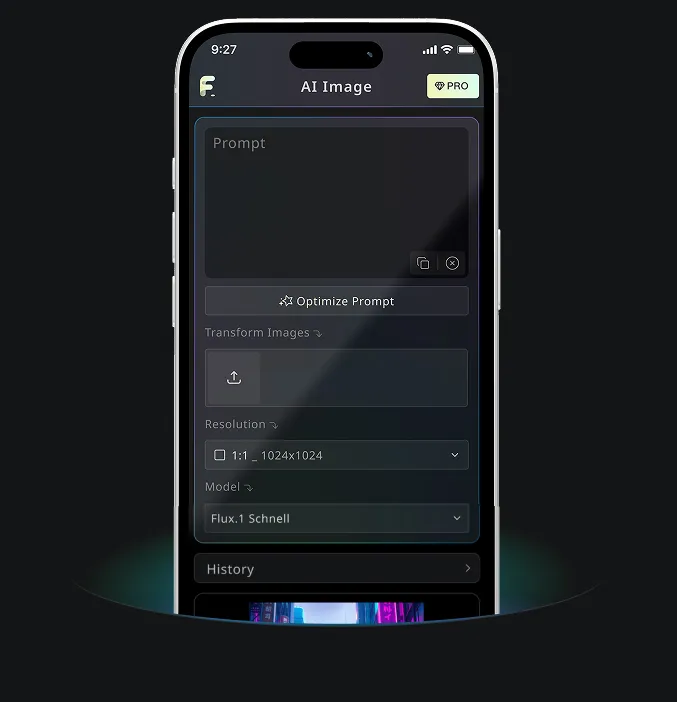
Free Text to Image Generator by Nano Banana AI
Free trial for higher quality image generation
Get a faster, higher-quality, ad-free experience of generating images through our professional website
Free Text to Image Generator Examples
See how Free Text to Image Generator turns written ideas into usable visuals, from quick concept drafts to detailed images for creative and content workflows.
Quick Image Generation

Create a clean 1:1 automotive design specification board on a light gray studio background. Feature a highly detailed 1980s Volvo 240 widebody show car, JUMDOO EDITION, in warm beige satin paint with satin black accents. The car should have a boxy Volvo 240 silhouette, very low air-suspension stance, extra-wide track width, riveted wide fender flares, deep black front splitter with near-ground clearance, black side skirts, black lower cladding, black deep-dish multi-spoke wheels, stretched low-profile tires, black grille with Volvo diagonal slash, one inner front headlight covered by an X-pattern insert for an asymmetric look, shaved clean body trim, dual center exhaust, and visible racing bucket seats. Add small JUMDOO branding on the front plate area, side skirt, and rear panel. Arrange six studio render views in a 3x2 grid: front 3/4, front, side profile, rear, rear close view, and rear 3/4. Use crisp realistic 3D product-render lighting, soft shadows, black sans-serif typography, thin gray divider lines, and minimal Swiss-style layout. Include a top-left title: VOLVO 240 WIDEBODY, subheadline: JUMDOO EDITION. Add small side panels for material swatches, colorway, branding locations, wheels and fitment, and notable details.

Create a high-end minimalist Keynote-style presentation cover slide with the aesthetic of Apple's industrial design. Use a 16:9 widescreen layout. The background should have a dark matte black on the upper half and a light concrete gray platform occupying one quarter of the bottom of the screen. Place a large, realistic floating rectangular panel in the center foreground on the right side. The panel should resemble a thin black glass device or a polished obsidian platform with mirror reflection, chamfered chrome metal edges, and precise industrial finish. The panel should be suspended above the light surface and cast a soft elongated shadow below it. Add a tall vertical gray metal wall or pillar on the rightmost edge for composition. Adopt extremely simple high-end artistic guidance, leaving a lot of negative space, using film studio lighting, subtle gradients, and a clear contrast between black and silver materials. On the left side, set a clean white sans-serif font and maintain clear hierarchy: a row of tiny titles " {argument name="system label" default="Apple-inspired presentation system"} ", a row of very large bold titles " {argument name="headline text" default="Clarity At Scale"} ", and a row of medium-sized subheadings " {argument name="subtitle text" default="The strongest slides behave like products." } ". Below it, include 3 numbered principles in a vertical list with dotted lines and fine spacing: "01 | {argument name="principle 1" default="One focal object"}", "02 | Binary light / dark rhythm", and "03 | Blue only for signal". Add a short thin horizontal line above the list and a tiny blue emphasis line below it. Draw a very thin horizontal guide line running through most of the slides near the top and label the page number "01" in the upper right corner. Repeat the small title "Apple-inspired presentation system" on the light-colored surface at the bottom left. The overall appearance: luxurious technology presentation, professional product launch slides, ultra-clean Swiss grid layout, restrained single-color palette (with a subtle blue accent), and realistic rendering effects integrated into the presentation design.

Create a character growth chart based on this image. [Current Character Information] - Name: {argument name="name" default="Brankide"} - Age: {argument name="age" default="5492 years old"} - Height: {argument name="height" default="207cm"} - Occupation: {argument name="job" default="Elven Battle Commander"} - Personality: {argument name="personality" default="Cold"} Mark the height scale at the edge. Create a natural growth process, dividing it chronologically into 5 years old, early adolescence, late adolescence, twenties, and current age. Display the full body image and clearly show the height differences.
Core Features of Free Text to Image Generator
Free Text to Image Generator interprets your prompt, style notes, scene details, and creative direction to produce clear AI images online. No design background or complex setup is needed.
Intelligent Text Parsing & Visual Generation
The tool reads your subject, setting, mood, style, action, and details, then converts that text into a visual result that matches your intent.
Multi-Model Supported Generation
Supports practical prompt-based image generation for styles ranging from illustrations and concept art to realistic scenes, product visuals, and social posts.
Instant Generation & Free Experience
Enter your text prompt and click the generate button. The tool creates an image in seconds without signup, waiting queues, or complex setup.
Editable & Privacy Protected
Download finished images, generate more variations, or refine your prompt for another attempt while keeping the workflow simple and privacy conscious.
Application Scenarios for Free Text to Image Generator
Free Text to Image Generator helps with digital art, ecommerce assets, social posts, brand visuals, and education materials. Turn plain text into images when you need concepts, drafts, or publishable visual ideas quickly.
Digital Art & Concept Design
Artists and designers can draft illustrations, concept art, mood images, and visual studies from simple text descriptions.
E-commerce & Ad Asset Creation
Marketing and ecommerce teams can turn product descriptions or campaign ideas into visual concepts, promotional graphics, and ad-ready drafts.
Social Media & Content Operation
Social teams can create post images, covers, themed illustrations, and campaign visuals that help content stand out in crowded feeds.
Education & Presentation Support
Teachers, presenters, and creators can convert lesson ideas or abstract concepts into visual aids for clearer communication.
How to Use Free Text to Image Generator in 3 Simple Steps
Describe your idea, generate an image, and refine the result in a simple text-to-image workflow.
Enter Your Prompt
Write what you want to see, including the subject, scene, style, lighting, colors, or mood.
Click Generate
Select the output ratio when available, then click Generate so the AI can turn your prompt into an image.
Download or Generate More
Save the finished image, adjust your prompt, or generate additional versions from the same idea.
Download Offline Games for Android and iOS
Keep no-wifi games installed before flights, commutes, and low-signal days. Use the official store buttons for safer downloads.