مولّد نص إلى صورة مجاني من Nano Banana AI
تجربة مجانية لتوليد صور عالية الجودة
احصل على تجربة أسرع وأعلى جودة وخالية من الإعلانات من خلال موقعنا الاحترافي
أمثلة على Free Text to Image Generator
شاهد كيف يحوّل Free Text to Image Generator الأفكار المكتوبة إلى مرئيات قابلة للاستخدام، من مسودات مفاهيم سريعة إلى صور تفصيلية لسير العمل الإبداعي والمحتوى.
توليد سريع للصور

Create a clean 1:1 automotive design specification board on a light gray studio background. Feature a highly detailed 1980s Volvo 240 widebody show car, JUMDOO EDITION, in warm beige satin paint with satin black accents. The car should have a boxy Volvo 240 silhouette, very low air-suspension stance, extra-wide track width, riveted wide fender flares, deep black front splitter with near-ground clearance, black side skirts, black lower cladding, black deep-dish multi-spoke wheels, stretched low-profile tires, black grille with Volvo diagonal slash, one inner front headlight covered by an X-pattern insert for an asymmetric look, shaved clean body trim, dual center exhaust, and visible racing bucket seats. Add small JUMDOO branding on the front plate area, side skirt, and rear panel. Arrange six studio render views in a 3x2 grid: front 3/4, front, side profile, rear, rear close view, and rear 3/4. Use crisp realistic 3D product-render lighting, soft shadows, black sans-serif typography, thin gray divider lines, and minimal Swiss-style layout. Include a top-left title: VOLVO 240 WIDEBODY, subheadline: JUMDOO EDITION. Add small side panels for material swatches, colorway, branding locations, wheels and fitment, and notable details.

Create a high-end minimalist Keynote-style presentation cover slide with the aesthetic of Apple's industrial design. Use a 16:9 widescreen layout. The background should have a dark matte black on the upper half and a light concrete gray platform occupying one quarter of the bottom of the screen. Place a large, realistic floating rectangular panel in the center foreground on the right side. The panel should resemble a thin black glass device or a polished obsidian platform with mirror reflection, chamfered chrome metal edges, and precise industrial finish. The panel should be suspended above the light surface and cast a soft elongated shadow below it. Add a tall vertical gray metal wall or pillar on the rightmost edge for composition. Adopt extremely simple high-end artistic guidance, leaving a lot of negative space, using film studio lighting, subtle gradients, and a clear contrast between black and silver materials. On the left side, set a clean white sans-serif font and maintain clear hierarchy: a row of tiny titles " {argument name="system label" default="Apple-inspired presentation system"} ", a row of very large bold titles " {argument name="headline text" default="Clarity At Scale"} ", and a row of medium-sized subheadings " {argument name="subtitle text" default="The strongest slides behave like products." } ". Below it, include 3 numbered principles in a vertical list with dotted lines and fine spacing: "01 | {argument name="principle 1" default="One focal object"}", "02 | Binary light / dark rhythm", and "03 | Blue only for signal". Add a short thin horizontal line above the list and a tiny blue emphasis line below it. Draw a very thin horizontal guide line running through most of the slides near the top and label the page number "01" in the upper right corner. Repeat the small title "Apple-inspired presentation system" on the light-colored surface at the bottom left. The overall appearance: luxurious technology presentation, professional product launch slides, ultra-clean Swiss grid layout, restrained single-color palette (with a subtle blue accent), and realistic rendering effects integrated into the presentation design.

Create a character growth chart based on this image. [Current Character Information] - Name: {argument name="name" default="Brankide"} - Age: {argument name="age" default="5492 years old"} - Height: {argument name="height" default="207cm"} - Occupation: {argument name="job" default="Elven Battle Commander"} - Personality: {argument name="personality" default="Cold"} Mark the height scale at the edge. Create a natural growth process, dividing it chronologically into 5 years old, early adolescence, late adolescence, twenties, and current age. Display the full body image and clearly show the height differences.
الميزات الأساسية لمولّد Free Text to Image Generator
يفسّر Free Text to Image Generator وصفك وملاحظات الأسلوب وتفاصيل المشهد والاتجاه الإبداعي لإنتاج صور ذكاء اصطناعي واضحة عبر الإنترنت. لا تحتاج إلى خلفية تصميم أو إعداد معقد.
تحليل ذكي للنص وتوليد بصري
تقرأ الأداة موضوعك وإعدادات المشهد والمزاج والأسلوب والحركة والتفاصيل، ثم تحوّل النص إلى نتيجة بصرية تطابق نيتك.
توليد مدعوم بعدة نماذج
يدعم توليد صور عمليًا قائمًا على الأوصاف لأساليب تمتد من الرسوم التوضيحية وفن المفاهيم إلى مشاهد واقعية ومرئيات منتجات ومنشورات السوشيال.
توليد فوري وتجربة مجانية
أدخل وصفك النصي وانقر زر التوليد. تنشئ الأداة صورة خلال ثوانٍ بدون تسجيل أو قوائم انتظار أو إعداد معقد.
قابل للتحرير ومحمي للخصوصية
نزّل الصور النهائية، وأنشئ مزيدًا من التنويعات، أو حسّن وصفك لمحاولة أخرى مع الحفاظ على بساطة سير العمل ومراعاة الخصوصية.
سيناريوهات تطبيق Free Text to Image Generator
يساعد Free Text to Image Generator في الفن الرقمي وأصول التجارة الإلكترونية ومنشورات السوشيال ومرئيات العلامة ومواد التعليم. حوّل النص العادي إلى صور عندما تحتاج إلى مفاهيم ومسودات أو أفكار بصرية جاهزة للنشر بسرعة.
فن رقمي وتصميم مفاهيمي
يمكن للفنانين والمصممين إعداد مسودات لرسوم توضيحية وفن مفاهيم وصور مزاجية ودراسات بصرية من أوصاف نصية بسيطة.
التجارة الإلكترونية وإنشاء أصول إعلانية
يمكن لفرق التسويق والتجارة الإلكترونية تحويل أوصاف المنتجات أو أفكار الحملات إلى مفاهيم بصرية ورسومات ترويجية ومسودات جاهزة للإعلانات.
وسائل التواصل وتشغيل المحتوى
يمكن لفرق السوشيال إنشاء صور للمنشورات وأغلفة ورسوم توضيحية ذات طابع ومرئيات حملات تساعد المحتوى على التميز في الخلاصات المزدحمة.
التعليم والتدريب
يمكن للمعلمين إنشاء رسوم توضيحية وأمثلة بصرية ومخططات ومرئيات لمساعدة الطلاب على فهم المفاهيم المجردة بشكل أفضل وتحويل مفاهيم المنتجات إلى وسائل بصرية لتواصل أوضح.
كيفية استخدام Free Text to Image Generator في 3 خطوات بسيطة
صف فكرتك، أنشئ صورة، ثم حسّن النتيجة ضمن سير عمل بسيط لنص-إلى-صورة.
أدخل وصفك (Prompt)
اكتب ما تريد رؤيته، بما في ذلك الموضوع والمشهد والأسلوب والإضاءة والألوان أو المزاج.
انقر Generate
اختر نسبة الإخراج عند توفرها، ثم انقر Generate حتى يتمكن الذكاء الاصطناعي من تحويل وصفك إلى صورة.
نزّل أو أنشئ المزيد
احفظ الصورة النهائية، عدّل وصفك، أو أنشئ إصدارات إضافية من الفكرة نفسها.
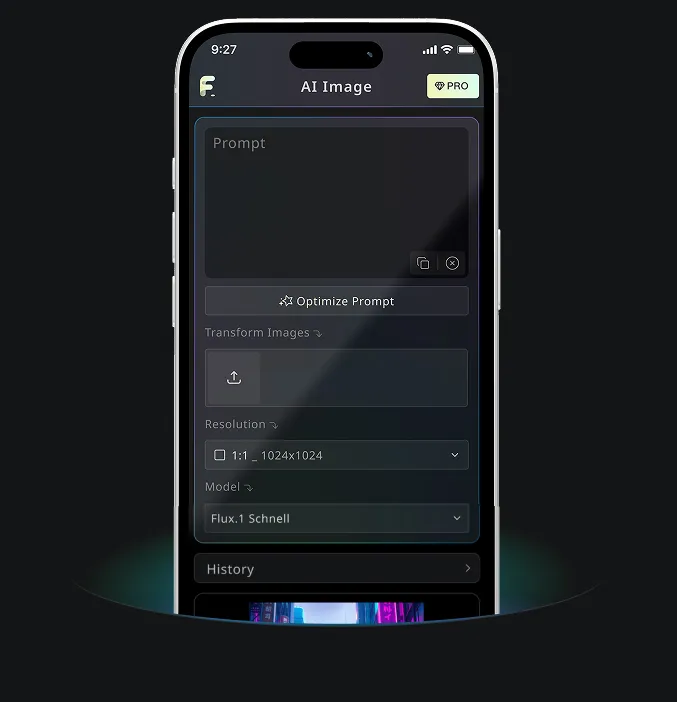
تطبيق جوال Android وiOS لـ Free Banana AI
نزّل تطبيق Free Banana AI للجوال لتعزيز إبداعك باستخدام أدوات توليد الصور بالذكاء الاصطناعي التي تحوّل الكلمات إلى مرئيات مذهلة.