Free GPT Image 2: generador y editor avanzado de imágenes con IA
Prueba gratuita de generación de imágenes de alta calidad
Obtén una experiencia más rápida, de mayor calidad y sin anuncios generando imágenes a través de nuestro sitio web profesional
Características principales de Free GPT Image 2
Una experiencia flexible de generación de imágenes con IA para creación de texto a imagen e imagen a imagen, diseñada para detalles nítidos, buen seguimiento del prompt, composición limpia e iteración creativa rápida.
Ejemplo de creación de texto a imagen

Create a fun, friendly magazine-style educational infographic poster for teenagers.Topic: Primordial black holes, Hawking evaporation, and memory-burden dark matter.Style: Playful hand-drawn diagrams, cute cartoon characters, clean bold typography. Warm and approachable.Canvas: Portrait orientation, warm cream paper texture, thin muted gray border.Headline: "THE BLACK HOLE THAT REFUSED TO DIE"Subtitle: "A tiny black hole from the Big Bang that might hide as dark matter"Credit: Thoss, Lopez-Honorez, Kühnel & HufnagelLayout sections:Top left: "Born in a flash" — Early universe swirl, tiny PBH (smaller than salt but heavier than mountain), 10^-30s clock, thermometer.Top right: "Normal black holes evaporate" — 3 shrinking stages with particle squiggles, Hawking quote sticker: "Black holes ain't so black".Center: "The memory burden twist" — Sad cartoon black hole with big "MEMORY" backpack, speech bubble "Too full to evaporate!", simple equation: normal speed ÷ (info)^k = very slow. Gia Dvali 2018.Lower middle: "Two kinds of ghost particles" — Fast cold particle vs slow warm particle, Big Bang to Today timeline.Bottom left: "Lyman-α forest" — Spiky absorption forest graphic, note "The forest would notice us".Bottom right: Rounded box "What this paper shows" — final summary.Colors: warm beige, dark navy, rust orange, dusty teal, soft brown, gray.Flat vector style with sketchy outlines, soft shadows, rounded friendly shapes.Dense but clear single-page poster with easy top-to-bottom flow. Make advanced physics feel fun for curious teens.

A clean premium promotional mockup in vertical triptych layout, showing three tall black-framed smartphones side by side.Left panel (soft lavender-to-blush gradient background):Elegant serif text “Fresh Pout.” at top.Phone screen displays a modern beauty landing page for Kosas lip product. Features: close-up beauty image at top, bold headline “Lips in their fullest expression.” (fullest in italic serif), dark rounded CTA button, 3 lip thumbnails, benefit tabs “Plumps / Tingles / Shines”, and 5 shade icons below. Clean cream and blush color scheme.Middle panel (lavender-to-deep-violet gradient):Serif text “Claude Code” at top.Phone shows typographic landing page with large bold stacked title “LIP PULSE.” and pink script line “is here.” below. Includes cropped portrait image, dark section with “Lips in their fullest expression.”, rounded button, and 6 shade cards in 2x3 grid at bottom.Right panel (dark navy textured background):Monospaced white text “GPT Images 2.0” at top.Phone displays pink-forward e-commerce page for Kosas: hero section with brand name “Kosas”, large title “The Lip Pulse”, angled pink lip gloss tube, feature icons, 6 lip swatches, and lower promotional pink product imagery.Overall style: editorial, minimal, high-end cosmetic campaign aesthetic. Symmetrical composition, exactly three vertical phones fully visible. Mix of elegant serif and bold sans-serif typography, soft pink and cream palettes, clean spacing, subtle shadows, sleek premium product design presentation.

Create a 1:1 editorial fashion moodboard for a fictional brand called VINCO. This should be a clean standalone moodboard artwork, not a screenshot of an app or interface, with no UI, no buttons, no text panel, and no device framing. The overall aesthetic blends Italian archival graphic design with late-1990s Southern California streetwear, mixing natural wine culture, skate utility, and sun-faded documentary fashion photography. Use gritty but precise art direction, midday outdoor light, slightly chaotic but disciplined typography, and real-person casting rather than polished fashion-model energy. Arrange exactly 4 images in a collage or editorial grid composition. Keep the layout organic, slightly imperfect, and art-directed like a campaign deck or printed reference board. Image 1: a young man in an oversized faded olive T-shirt and dark pants standing in front of an off-white poster-like backdrop with bold VINCO branding, barcode graphics, and small editorial text. Image 2: a close-up still life of a dark wine bottle with a minimalist white label reading VINCO, photographed in warm sunlight with tactile paper texture and shadow. Image 3: a person from the back in a washed olive long-sleeve shirt with subtle branding, white shorts, and a yellow hanging tag or sticker element near the top right, posed against a pale wall with blue stripe detail and editorial layout text. Image 4: a skateboarder crouching or riding away, photographed from behind, wearing a white T-shirt with a large black graphic block on the back and dark shorts, in golden sun on pavement. Use earthy tones throughout: olive, cream, charcoal, sun-bleached white, asphalt gray, muted brown, and one fluorescent yellow-green accent repeated in small details. The final image should feel like a refined editorial collage board, not a software screenshot.
Ejemplo de edición de imágenes

design an original game art for an ancient European battlefield game (without text)

Create a complete visual world-building model for a civilization with the style of reference image, including multiple images of buildings, characters, clothing, vehicles and maps, using a unified design language and featuring a cinematic-like realism with extremely rich details.
Ejemplo de diseño guiado por referencia

A futuristic premium brand identity moodboard for “Flaren”, a visionary optical technology / AI eyewear brand. Large hero image of a young woman in transparent clear-frame glasses, close-up side profile, looking upward, blue eye reflection, soft skin texture, dark cinematic lighting, violet and electric purple glow on the lens, mysterious and intelligent atmosphere. Below the hero image, create a polished brand presentation grid with multiple rounded-rectangle mockup tiles: black flag with logo, purple exhibition booth, branded rain jacket, laptop interface, business cards, packaging box, app icon, lanyard ID badge, product detail shots. Use a minimal geometric star/cross logo symbol, modern rounded sans-serif wordmark, high contrast black background, vivid purple accents, glossy materials, glass reflections, soft shadows, luxury tech aesthetic, cinematic product photography, clean Swiss grid layout, professional branding case study, Behance-style presentation, ultra realistic, high detail, 3:2 vertical composition.

Based on the design concept of this picture, please help me create a mood board for "Felix". The main color of Felix is #E84E1F, with a black background. It is mainly for a brand in the direction of FinTech, you need to replace the logo to match the overall style.
Ventajas de Free GPT Image 2
Free GPT Image 2 ayuda a los creadores a pasar de la idea a una imagen usable rápidamente, combinando prompts en lenguaje natural, soporte con imágenes de referencia y múltiples relaciones de aspecto para la producción visual del día a día.
Comprensión del prompt de alta fidelidad
Describe el sujeto, la escena, la iluminación, el ángulo de cámara, el estilo visual y el ambiente en lenguaje natural, y genera imágenes que sigan tu dirección creativa con gran detalle y composición coherente.
Flujo de texto a imagen e imagen a imagen
Empieza solo con un prompt o combina un prompt con hasta cinco imágenes de referencia subidas para crear variaciones, rediseñar imágenes existentes, refinar fotos de productos o explorar nuevos estilos.
Soporte flexible de relaciones de aspecto
Genera imágenes para publicaciones cuadradas, retratos, banners, miniaturas, pósteres y escenas panorámicas con proporciones populares, incluidas 1:1, 3:2, 2:3, 3:4, 4:3, 4:5, 5:4, 9:16, 16:9 y 21:9.
Mejores resultados para diseño práctico
Ideal para conceptos de marketing, visuales para redes sociales, mockups, storyboards, gráficos educativos y experimentos de marca donde importan la claridad, el control del diseño y revisiones rápidas.
Escenarios de aplicación de Free GPT Image 2
Usa Free GPT Image 2 para generación rápida de imágenes con IA online en marketing, diseño, educación, ecommerce, creatividad personal y producción de contenido.
Redes sociales y contenido para creadores
Genera publicaciones llamativas, miniaturas, visuales de perfil, portadas para videos cortos e imágenes de campaña con la maquetación adecuada para cada plataforma.
Publicidad y conceptos de producto
Crea escenas de producto, mockups de estilo de vida, pósteres promocionales, conceptos de empaque y variaciones de anuncios antes de dedicar tiempo a la producción completa.
Edición de fotos y remezcla visual
Sube imágenes de referencia para ajustar el estilo, rediseñar escenas, explorar nuevos fondos, cambiar la dirección visual o crear variaciones de imagen más consistentes.
Diseño para educación y presentaciones
Convierte ideas abstractas en ilustraciones claras, visuales para lecciones, gráficos para diapositivas, diagramas e imágenes explicativas para el aprendizaje y la comunicación.
Cómo usar Free GPT Image 2
Genera o edita imágenes con IA en un flujo unificado y simple: introduce un prompt, opcionalmente sube imágenes de referencia, elige una relación de aspecto y crea tu imagen final.
Introduce tu prompt de imagen
Escribe lo que quieres crear, incluyendo sujeto, entorno, estilo, color, ángulo de cámara, iluminación, texto y cualquier detalle visual importante.
Sube imágenes de referencia si es necesario
Para generación de imagen a imagen, añade de una a cinco imágenes de referencia y explica cómo debería transformarse, preservarse o reinterpretarse el resultado a partir de las imágenes subidas.
Elige proporción y genera
Selecciona una relación de aspecto como 1:1, 4:5, 9:16, 16:9 o 21:9; luego genera, previsualiza, refina tu prompt y exporta la imagen cuando esté lista.
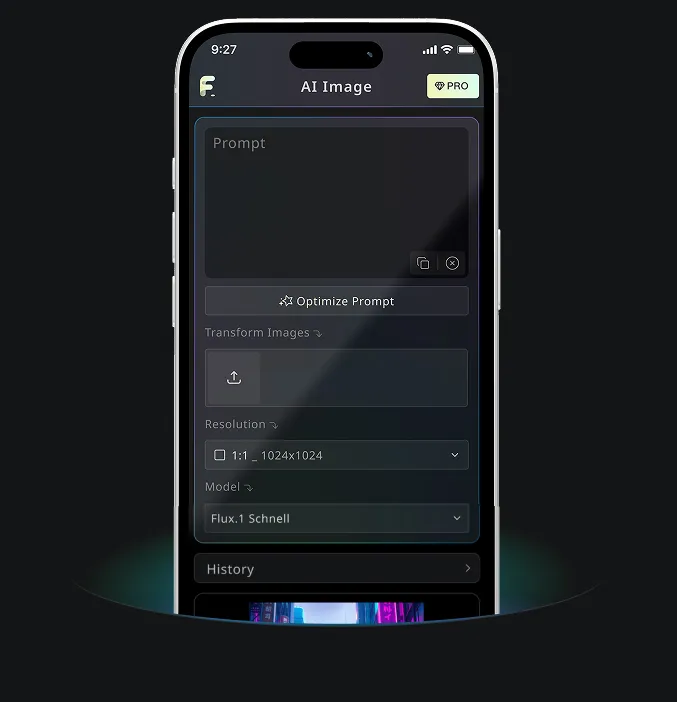
Aplicación móvil Android e iOS para Free Banana AI
Descarga la app móvil de Free Banana AI para potenciar tu creatividad con herramientas de generación de imágenes por IA que transforman palabras en imágenes impresionantes.