เครื่องมือสร้างข้อความเป็นภาพฟรี โดย Nano Banana AI
ทดลองใช้ฟรีสำหรับสร้างภาพคุณภาพสูง
สัมผัสประสบการณ์สร้างภาพที่เร็วขึ้น คุณภาพดีกว่า และไม่มีโฆษณาผ่านเว็บไซต์มืออาชีพของเรา
ตัวอย่าง Free Text to Image Generator
ดูว่า Free Text to Image Generator เปลี่ยนไอเดียที่เขียนเป็นภาพที่นำไปใช้ได้อย่างไร ตั้งแต่ร่างคอนเซ็ปต์อย่างไวไปจนถึงภาพละเอียดสำหรับเวิร์กโฟลว์ครีเอทีฟและคอนเทนต์
สร้างภาพอย่างรวดเร็ว

Create a clean 1:1 automotive design specification board on a light gray studio background. Feature a highly detailed 1980s Volvo 240 widebody show car, JUMDOO EDITION, in warm beige satin paint with satin black accents. The car should have a boxy Volvo 240 silhouette, very low air-suspension stance, extra-wide track width, riveted wide fender flares, deep black front splitter with near-ground clearance, black side skirts, black lower cladding, black deep-dish multi-spoke wheels, stretched low-profile tires, black grille with Volvo diagonal slash, one inner front headlight covered by an X-pattern insert for an asymmetric look, shaved clean body trim, dual center exhaust, and visible racing bucket seats. Add small JUMDOO branding on the front plate area, side skirt, and rear panel. Arrange six studio render views in a 3x2 grid: front 3/4, front, side profile, rear, rear close view, and rear 3/4. Use crisp realistic 3D product-render lighting, soft shadows, black sans-serif typography, thin gray divider lines, and minimal Swiss-style layout. Include a top-left title: VOLVO 240 WIDEBODY, subheadline: JUMDOO EDITION. Add small side panels for material swatches, colorway, branding locations, wheels and fitment, and notable details.

Create a high-end minimalist Keynote-style presentation cover slide with the aesthetic of Apple's industrial design. Use a 16:9 widescreen layout. The background should have a dark matte black on the upper half and a light concrete gray platform occupying one quarter of the bottom of the screen. Place a large, realistic floating rectangular panel in the center foreground on the right side. The panel should resemble a thin black glass device or a polished obsidian platform with mirror reflection, chamfered chrome metal edges, and precise industrial finish. The panel should be suspended above the light surface and cast a soft elongated shadow below it. Add a tall vertical gray metal wall or pillar on the rightmost edge for composition. Adopt extremely simple high-end artistic guidance, leaving a lot of negative space, using film studio lighting, subtle gradients, and a clear contrast between black and silver materials. On the left side, set a clean white sans-serif font and maintain clear hierarchy: a row of tiny titles " {argument name="system label" default="Apple-inspired presentation system"} ", a row of very large bold titles " {argument name="headline text" default="Clarity At Scale"} ", and a row of medium-sized subheadings " {argument name="subtitle text" default="The strongest slides behave like products." } ". Below it, include 3 numbered principles in a vertical list with dotted lines and fine spacing: "01 | {argument name="principle 1" default="One focal object"}", "02 | Binary light / dark rhythm", and "03 | Blue only for signal". Add a short thin horizontal line above the list and a tiny blue emphasis line below it. Draw a very thin horizontal guide line running through most of the slides near the top and label the page number "01" in the upper right corner. Repeat the small title "Apple-inspired presentation system" on the light-colored surface at the bottom left. The overall appearance: luxurious technology presentation, professional product launch slides, ultra-clean Swiss grid layout, restrained single-color palette (with a subtle blue accent), and realistic rendering effects integrated into the presentation design.

Create a character growth chart based on this image. [Current Character Information] - Name: {argument name="name" default="Brankide"} - Age: {argument name="age" default="5492 years old"} - Height: {argument name="height" default="207cm"} - Occupation: {argument name="job" default="Elven Battle Commander"} - Personality: {argument name="personality" default="Cold"} Mark the height scale at the edge. Create a natural growth process, dividing it chronologically into 5 years old, early adolescence, late adolescence, twenties, and current age. Display the full body image and clearly show the height differences.
ฟีเจอร์หลักของ Free Text to Image Generator
Free Text to Image Generator ตีความพรอมต์ของคุณ โน้ตสไตล์ รายละเอียดฉาก และทิศทางสร้างสรรค์เพื่อสร้างภาพ AI ออนไลน์ที่ชัดเจน ไม่จำเป็นต้องมีพื้นฐานด้านดีไซน์หรือการตั้งค่าซับซ้อน
การแยกวิเคราะห์ข้อความอย่างชาญฉลาดและการสร้างภาพ
เครื่องมือนี้อ่านหัวข้อ สถานที่ อารมณ์ สไตล์ แอ็กชัน และรายละเอียดของคุณ แล้วแปลงข้อความนั้นเป็นผลลัพธ์ภาพที่ตรงกับเจตนาของคุณ
การสร้างที่รองรับหลายโมเดล
รองรับการสร้างภาพจากพรอมต์ที่ใช้งานได้จริงสำหรับสไตล์ตั้งแต่ภาพประกอบและคอนเซ็ปต์อาร์ตไปจนถึงฉากสมจริง ภาพสินค้า และโพสต์โซเชียล
สร้างทันทีและประสบการณ์ฟรี
ใส่พรอมต์ข้อความแล้วกดปุ่มสร้าง เครื่องมือนี้สร้างภาพได้ภายในไม่กี่วินาทีโดยไม่ต้องสมัคร ไม่มีคิวรอ และไม่ต้องตั้งค่าซับซ้อน
แก้ไขได้และคุ้มครองความเป็นส่วนตัว
ดาวน์โหลดภาพที่เสร็จแล้ว สร้างเวอร์ชันเพิ่มเติม หรือปรับพรอมต์เพื่อทดลองใหม่ โดยยังคงเวิร์กโฟลว์ให้เรียบง่ายและใส่ใจความเป็นส่วนตัว
สถานการณ์การใช้งาน Free Text to Image Generator
Free Text to Image Generator ช่วยในงานศิลป์ดิจิทัล แอสเซ็ตอีคอมเมิร์ซ โพสต์โซเชียล ภาพแบรนด์ และสื่อการศึกษา เปลี่ยนข้อความธรรมดาให้เป็นภาพเมื่อคุณต้องการคอนเซ็ปต์ ร่าง หรือไอเดียภาพที่พร้อมเผยแพร่อย่างรวดเร็ว
งานศิลป์ดิจิทัลและการออกแบบคอนเซ็ปต์
ศิลปินและดีไซเนอร์สามารถร่างภาพประกอบ คอนเซ็ปต์อาร์ต ภาพมู้ด และการศึกษาด้านภาพจากคำบรรยายสั้นๆ ได้
อีคอมเมิร์ซและการสร้างแอสเซ็ตโฆษณา
ทีมการตลาดและอีคอมเมิร์ซสามารถเปลี่ยนคำบรรยายสินค้า หรือไอเดียแคมเปญ ให้เป็นคอนเซ็ปต์ภาพ กราฟิกโปรโมต และร่างที่พร้อมทำโฆษณา
โซเชียลมีเดียและการดำเนินงานคอนเทนต์
ทีมโซเชียลสามารถสร้างภาพโพสต์ ปก ภาพประกอบตามธีม และภาพแคมเปญที่ช่วยให้คอนเทนต์โดดเด่นท่ามกลางฟีดที่แน่น
การสนับสนุนด้านการศึกษาและพรีเซนเทชัน
ครู ผู้นำเสนอ และครีเอเตอร์สามารถแปลงไอเดียบทเรียนหรือแนวคิดนามธรรมให้เป็นสื่อภาพเพื่อการสื่อสารที่ชัดเจนขึ้น
วิธีใช้ Free Text to Image Generator ใน 3 ขั้นตอนง่ายๆ
อธิบายไอเดียของคุณ สร้างภาพ และปรับผลลัพธ์ในเวิร์กโฟลว์ text-to-image ที่เรียบง่าย
ใส่พรอมต์ของคุณ
เขียนสิ่งที่คุณอยากเห็น รวมถึงหัวข้อ ฉาก สไตล์ แสง สี หรืออารมณ์
กดสร้าง
เลือกอัตราส่วนผลลัพธ์เมื่อมีให้ แล้วกด Generate เพื่อให้ AI เปลี่ยนพรอมต์ของคุณเป็นภาพ
ดาวน์โหลดหรือสร้างเพิ่มเติม
บันทึกภาพที่เสร็จแล้ว ปรับพรอมต์ หรือสร้างเวอร์ชันเพิ่มเติมจากไอเดียเดิม
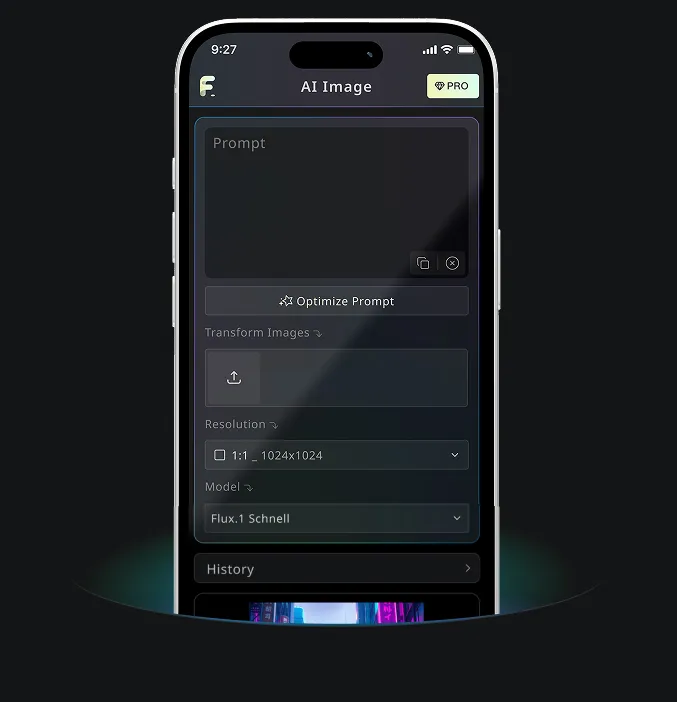
แอปมือถือ Android และ iOS สำหรับ Free Banana AI
ดาวน์โหลดแอปมือถือ Free Banana AI เพื่อเพิ่มพลังความคิดสร้างสรรค์ด้วยเครื่องมือสร้างภาพ AI ที่เปลี่ยนคำพูดให้เป็นภาพที่น่าทึ่ง