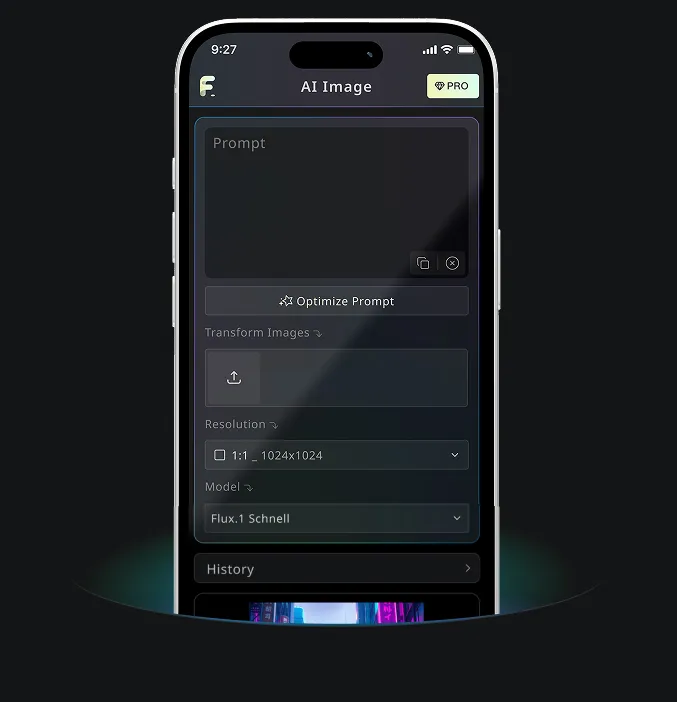
Nano Banana AI による無料テキストから画像生成ツール
高画質画像生成が無料で試せます
プロフェッショナルサイトでより速く高品質、広告なしで画像生成体験を提供します
Free Text to Image Generator の例
Free Text to Image Generatorが、素早いアイデア下書きから、クリエイティブ/コンテンツ制作向けの詳細な画像まで、文章のアイデアを使えるビジュアルに変える様子をご覧ください。
素早い画像生成

Create a clean 1:1 automotive design specification board on a light gray studio background. Feature a highly detailed 1980s Volvo 240 widebody show car, JUMDOO EDITION, in warm beige satin paint with satin black accents. The car should have a boxy Volvo 240 silhouette, very low air-suspension stance, extra-wide track width, riveted wide fender flares, deep black front splitter with near-ground clearance, black side skirts, black lower cladding, black deep-dish multi-spoke wheels, stretched low-profile tires, black grille with Volvo diagonal slash, one inner front headlight covered by an X-pattern insert for an asymmetric look, shaved clean body trim, dual center exhaust, and visible racing bucket seats. Add small JUMDOO branding on the front plate area, side skirt, and rear panel. Arrange six studio render views in a 3x2 grid: front 3/4, front, side profile, rear, rear close view, and rear 3/4. Use crisp realistic 3D product-render lighting, soft shadows, black sans-serif typography, thin gray divider lines, and minimal Swiss-style layout. Include a top-left title: VOLVO 240 WIDEBODY, subheadline: JUMDOO EDITION. Add small side panels for material swatches, colorway, branding locations, wheels and fitment, and notable details.

Create a high-end minimalist Keynote-style presentation cover slide with the aesthetic of Apple's industrial design. Use a 16:9 widescreen layout. The background should have a dark matte black on the upper half and a light concrete gray platform occupying one quarter of the bottom of the screen. Place a large, realistic floating rectangular panel in the center foreground on the right side. The panel should resemble a thin black glass device or a polished obsidian platform with mirror reflection, chamfered chrome metal edges, and precise industrial finish. The panel should be suspended above the light surface and cast a soft elongated shadow below it. Add a tall vertical gray metal wall or pillar on the rightmost edge for composition. Adopt extremely simple high-end artistic guidance, leaving a lot of negative space, using film studio lighting, subtle gradients, and a clear contrast between black and silver materials. On the left side, set a clean white sans-serif font and maintain clear hierarchy: a row of tiny titles " {argument name="system label" default="Apple-inspired presentation system"} ", a row of very large bold titles " {argument name="headline text" default="Clarity At Scale"} ", and a row of medium-sized subheadings " {argument name="subtitle text" default="The strongest slides behave like products." } ". Below it, include 3 numbered principles in a vertical list with dotted lines and fine spacing: "01 | {argument name="principle 1" default="One focal object"}", "02 | Binary light / dark rhythm", and "03 | Blue only for signal". Add a short thin horizontal line above the list and a tiny blue emphasis line below it. Draw a very thin horizontal guide line running through most of the slides near the top and label the page number "01" in the upper right corner. Repeat the small title "Apple-inspired presentation system" on the light-colored surface at the bottom left. The overall appearance: luxurious technology presentation, professional product launch slides, ultra-clean Swiss grid layout, restrained single-color palette (with a subtle blue accent), and realistic rendering effects integrated into the presentation design.

Create a character growth chart based on this image. [Current Character Information] - Name: {argument name="name" default="Brankide"} - Age: {argument name="age" default="5492 years old"} - Height: {argument name="height" default="207cm"} - Occupation: {argument name="job" default="Elven Battle Commander"} - Personality: {argument name="personality" default="Cold"} Mark the height scale at the edge. Create a natural growth process, dividing it chronologically into 5 years old, early adolescence, late adolescence, twenties, and current age. Display the full body image and clearly show the height differences.
Free Text to Image Generator の主要機能
Free Text to Image Generatorは、プロンプト、スタイルメモ、シーン詳細、制作方向性を解釈し、オンラインでクリアなAI画像を生成します。デザイン経験や複雑な設定は不要です。
賢いテキスト解析&ビジュアル生成
ツールが被写体、設定、雰囲気、スタイル、動作、詳細を読み取り、そのテキストを意図に合うビジュアル結果へ変換します。
複数モデル対応の生成
イラストやコンセプトアートからリアルなシーン、商品ビジュアル、SNS投稿まで、幅広いスタイルの実用的なプロンプト生成に対応します。
即時生成&無料体験
テキストプロンプトを入力して生成ボタンをクリックするだけ。登録や待機キュー、複雑な設定なしで数秒で画像を作成します。
編集可能&プライバシー保護
完成画像をダウンロードし、バリエーションを追加生成したり、プロンプトを調整して再挑戦したりできます。シンプルさとプライバシーへの配慮を両立しています。
Free Text to Image Generator の活用シーン
Free Text to Image Generatorは、デジタルアート、EC素材、SNS投稿、ブランドビジュアル、教育資料に役立ちます。コンセプト、下書き、公開可能なビジュアル案が必要なとき、平易な文章から素早く画像化できます。
デジタルアート&コンセプトデザイン
アーティストやデザイナーは、簡単な文章説明からイラスト、コンセプトアート、ムード画像、ビジュアルスタディを作成できます。
EC&広告素材制作
マーケティングやECチームは、商品説明やキャンペーン案をビジュアルコンセプト、販促グラフィック、広告用下書きに変換できます。
SNS運用&コンテンツ制作
SNSチームは投稿画像、カバー、テーマイラスト、キャンペーンビジュアルを作成し、混み合うフィードでも目立つコンテンツにできます。
教育&プレゼン支援
教師、発表者、クリエイターは授業案や抽象概念を視覚資料に変換し、より分かりやすいコミュニケーションを実現できます。
Free Text to Image Generator の3ステップ
アイデアを説明し、画像を生成し、シンプルなテキストから画像のワークフローで結果を調整します。
プロンプトを入力
被写体、シーン、スタイル、光、色、雰囲気など、見たい内容を書きます。
生成をクリック
利用可能な場合は出力比率を選び、GenerateをクリックしてAIにプロンプトを画像に変換させます。
ダウンロードまたは追加生成
完成画像を保存し、プロンプトを調整するか、同じアイデアから追加バージョンを生成します。
Free Banana AI のAndroid・iOSモバイルアプリ
Free Banana AIモバイルアプリをダウンロードして、言葉を美しいビジュアルに変えるAI画像生成ツールで創造力を高めましょう。